

Description
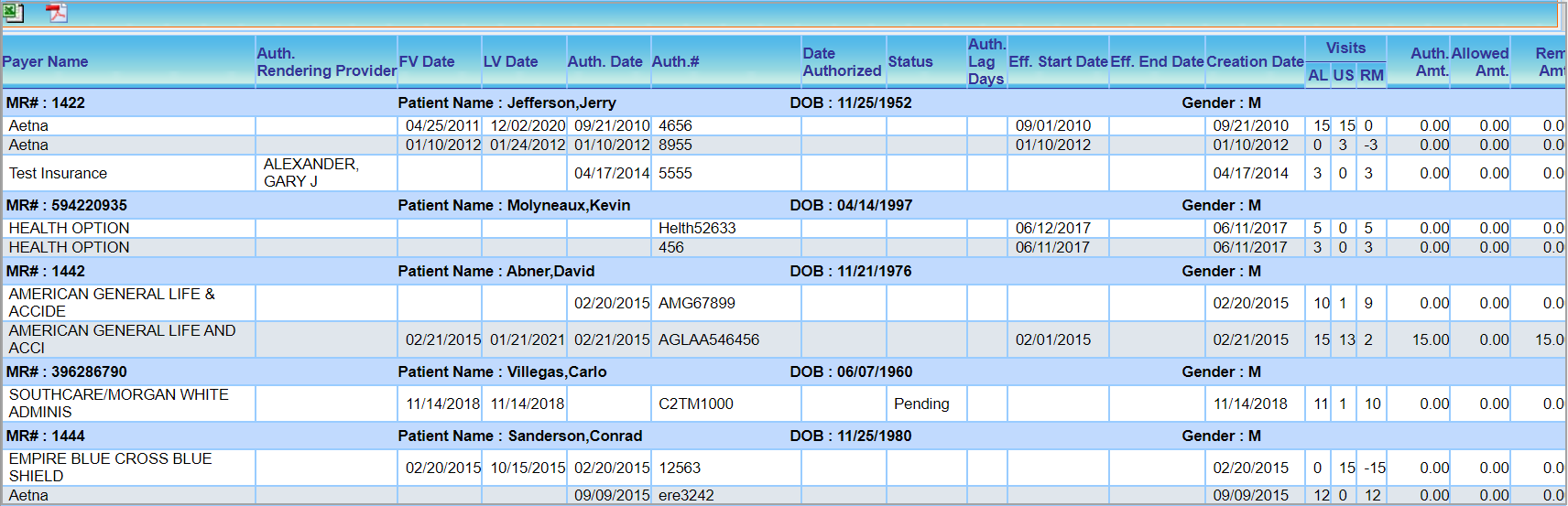
This report lists the authorizations with their remaining visit counts and expiration dates.
Significance
The report provides payer-wise authorizations received by each patient in the given date range.
Search Filters of B5 Report
| Field | Description |
| Valid Auth From/To | Provide authorization valid from and to dates, or select an appropriate value from the drop-down. |
| Date Authorized From/To | Provide authorized dates from and to or select an appropriate value from the drop-down |
| Creation Date From/To | Provide authorization creation dates from and to or select an appropriate value from the drop-down |
| Insurance | To search for authorizations by payers |
| Patient | To search by Patients |
| Visits Remaining | To search authorizations by the number of visits remaining; accepts ‘Days remaining’ as a range; user has to enter data in both the fields for this filter to work |
| Summary/Detailed | To select whether the user wants a summary or detailed report |
| Include Inactive Authorizations | Check this box to include inactive authorizations as well in the search result |
Search Screen of B5 Report

Sample B5 Report
Possible Outputs of B5 Report
| Output | Download and View Sample |
| Excel |  |
 |
Was this helpful?
Thanks for your feedback!