• Home
  • Academy
    • Training Videos
    • Webinars
  • Release Docs
  • MIPS
  • FAQs
  • Contact
PracticeSuite – Help
  • Home
  • Academy
    • Training Videos
    • Webinars
  • Release Docs
  • MIPS
  • FAQs
  • Contact

Portal Access

/Patient & Patient Account /Portal Access
  • April 1, 2026
  • Noel Johnson
On Demand Webinar Series

Portal Setup

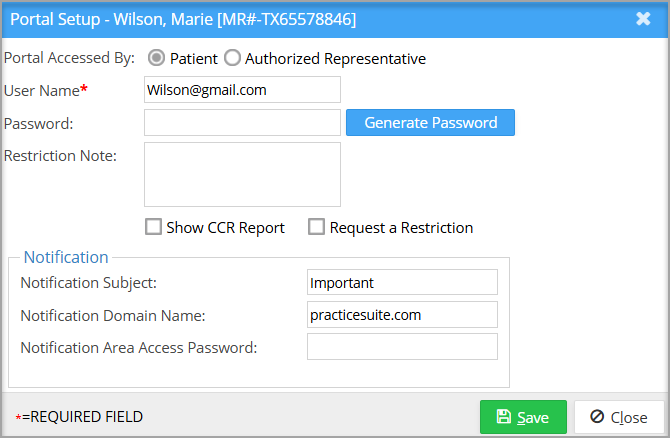
The patient portal Setup page in patient demographics helps set up the patient’s portal credentials, along with CCDA restriction setup and CCR report availability.

Portal Setup Screen

Patient Portal Setup

Field Description
Portal Accessed By Patient/Authorized Representative
Username By default, the patient’s email ID will be populated.
Password Either provide a password or use the generate password option.
Request a Restriction Choose this to restrict CCDA information from displaying on the patient portal.
Restriction Note To add additional context for the restrictions.
Show CCR Report Select this to show CCR report on patient portal


Was this helpful?

Yes
No
Thanks for your feedback!

Free, Interactive Billing Training Webinars

Register Here

Categories

  • Introduction to Practicesuite 6
  • Authorization 3
  • Online Review Management (ORM 6
  • Setup & Advanced Setup 40
  • Scheduler 29
  • Patient & Patient Account 32
  • Patient Portal 16
  • Charges & Claims 38
  • Payments 25
  • Add-On Services 8
  • Referrals 1
  • EHR 131
  • Report Central 146
  • Collections 5
  • Security 7
  • FAQs 106
  • Product Release 83
  • Inter Office Messaging 4
  • Time Card 1
  • Workflow 3
  • Miscellaneous 4
Copyright © 2026 PracticeSuite Inc. All Rights Reserved.