Diagnosis Code Lookup
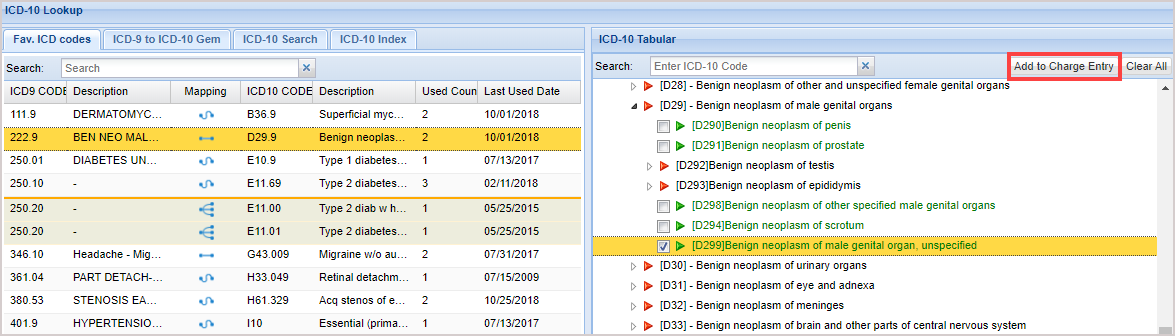
The ICD-10 Lookup screen is an excellent training tool for physicians and practices in their transition to ICD-10. The ICD-10 lookup page is designed with two sections, one section with ICD-10 Lookup and the other section with ICD-10 tabular view.
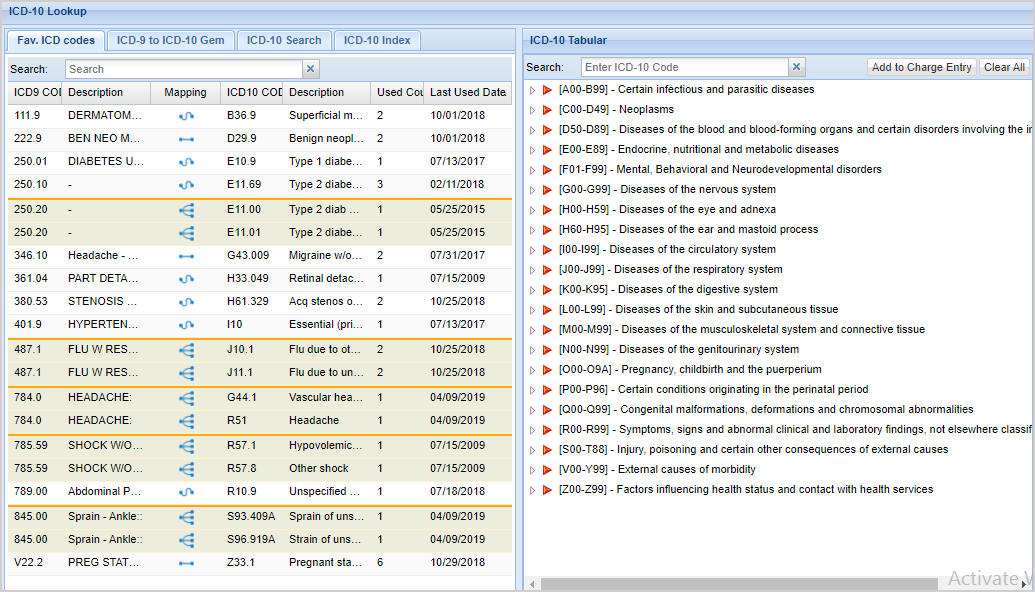
1. The ICD-10 Lookup interface comes with a feature that will display four tabs named Fav ICD codes (Favorite ICD codes), ICD 9 to ICD 10 GEM lookup, ICD 10 Search, and ICD 10 Index so that the healthcare professionals can compare both code sets for a particular diagnosis or treatment.
2. Fav ICD codes show the codes that are frequently used by the provider/practice for the past 3 years through EHR and Charge Entry screens.
3. There are match indicators, which indicate whether the ICD-9 code will have a direct, approximate, or one-to-many relation with the ICD-10 matches. The indicator will show the type of match on mouse hover.
4. After a physician or coder enters a medical keyword or phrase in the search field, the relevant search results will be displayed below. Once an ICD-9 code is selected from the displayed results, the appropriate ICD-10 tabular will be automatically selected.

5. The tabular list is a numerical list of ICD-10 codes, grouped by chapter, categories, and subcategories. It is important to review the description notes to ensure the selection of the appropriate code. The search results with green arrows indicate billable codes, and red arrows indicate non-billable codes.
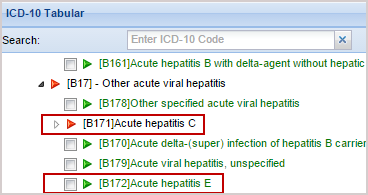
6. Click the relevant ICD-10 code checkbox from the tabular list and click the Add to Charge Entry to add the selected codes to the appropriate fields.