

• Home
  • Academy
    • Training Videos
    • Webinars
  • Release Docs
  • MIPS
  • FAQs
  • Contact
PracticeSuite – Help
  • Home
  • Academy
    • Training Videos
    • Webinars
  • Release Docs
  • MIPS
  • FAQs
  • Contact

Patient Inbox

/Patient & Patient Account /Patient Inbox
  • November 6, 2019
  • Thripta
On Demand Webinar Series

Description

The Inbox tab of the Patient Demographics page facilitates interoffice communication regarding matters related to a patient.

How to Access Patient Inbox

Open the Patient Demographics page of a patient and click on the Inbox tab.
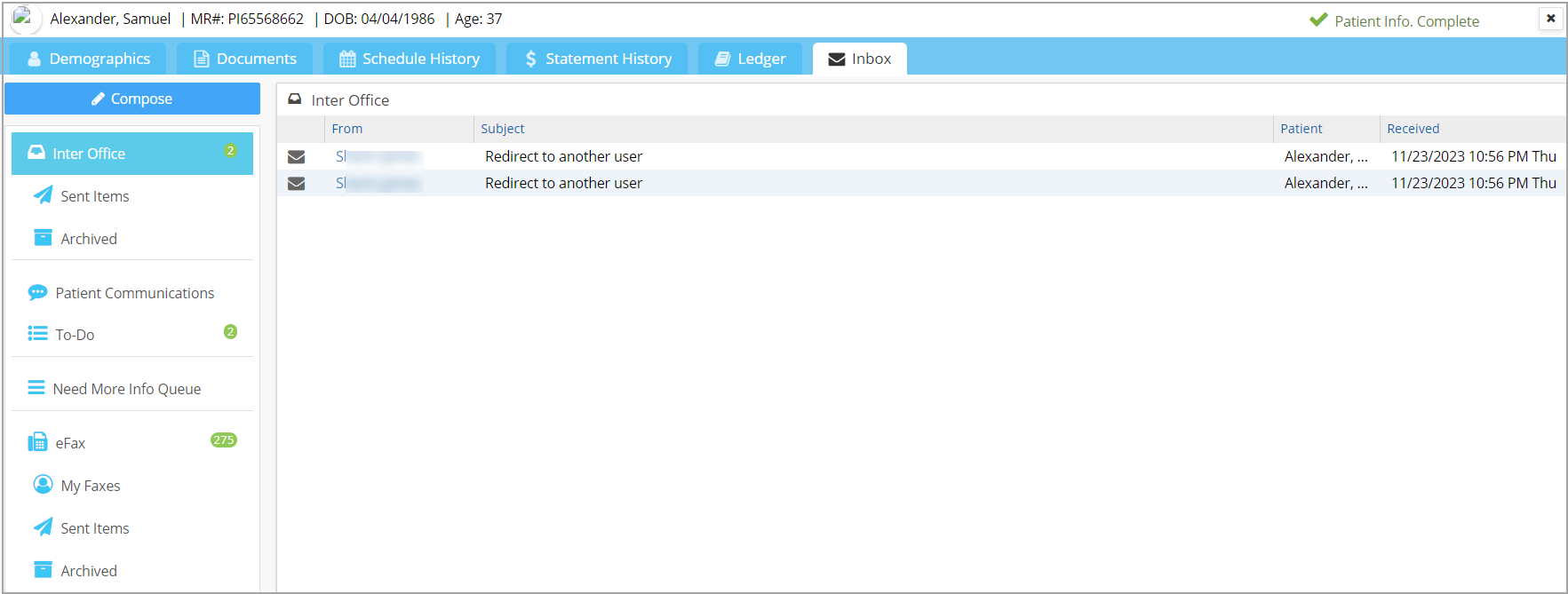
The below-listed sections will open up when the screen is accessed from Patient module.

1.  Inter Office Messages

2. Patient Communications

3. To-Do List

4. Need More Info Queue

5. eFax

Note: When accessed from Demographics/EHR, the above-listed sections (except Need More Info Queue) will display only those messages specific to the patient.

Was this helpful?

Yes
No
Thanks for your feedback!

Free, Interactive Billing Training Webinars

Register Here

Categories

  • Introduction to Practicesuite 6
  • Authorization 3
  • Online Review Management (ORM 6
  • Setup & Advanced Setup 40
  • Scheduler 29
  • Patient & Patient Account 31
  • Patient Portal 15
  • Charges & Claims 38
  • Payments 22
  • Add-On Services 8
  • Referrals 1
  • EHR 131
  • Report Central 146
  • Collections 5
  • Security 7
  • FAQs 105
  • Product Release 82
  • Inter Office Messaging 4
  • Time Card 1
  • Workflow 3
  • Miscellaneous 4
Copyright © 2026 PracticeSuite Inc. All Rights Reserved.